Project Tunnel gives a TCP service on a private machine a listener on a public VPS. Beacon opens one outbound QUIC connection to Edge. Edge can then open independent bidirectional streams on that connection. The home router needs no inbound port forward. The VPS must accept the relay's UDP port and the intended public traffic. Example Edge profile[1] · Example Beacon profile[2]
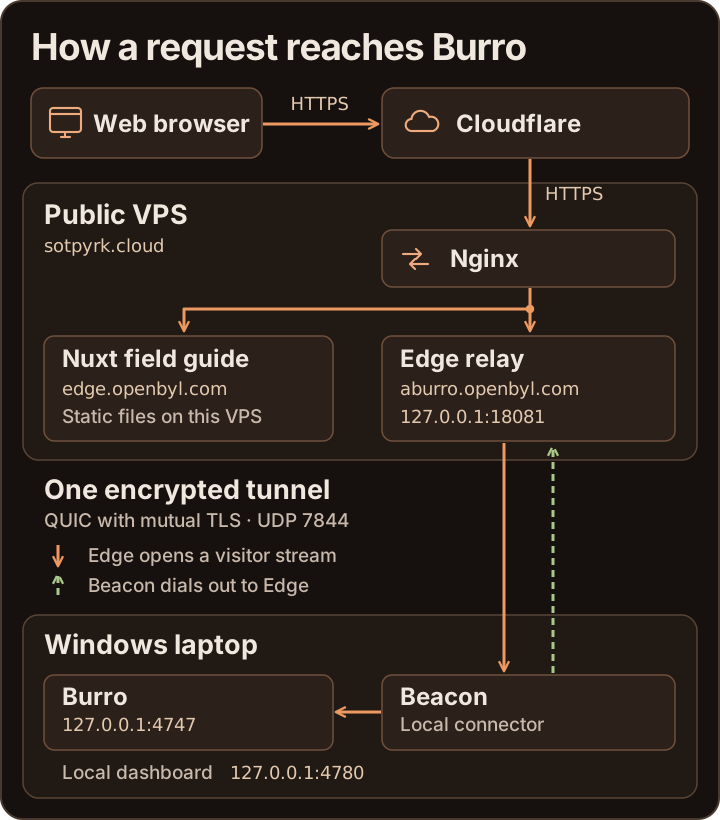
Follow a Burro request
| Stage | What happens in the documented OpenBYL deployment |
|---|---|
| 1. Connect the device | Beacon dials sotpyrk.cloud:7844 over UDP. It verifies the private CA and the Edge certificate name edge.openbyl.com. Edge requires a valid client certificate and matches its leaf SHA-256 fingerprint to an enrolled device. The ready acknowledgment confirms that Edge accepted the identity. TLS configuration[3] · Edge session authorization[4] |
| 2. Accept a visitor | A browser visits https://aburro.openbyl.com. HTTPS terminates at Cloudflare and again at Nginx on the VPS on a separate HTTPS connection. Nginx passes the permitted request to the Edge TCP listener on 127.0.0.1:18081. Burro virtual host[5] |
| 3. Select the origin | Edge knows which device owns that listener. For each accepted TCP connection, it opens a stream on the device's existing QUIC session and sends the selector burro. Beacon looks up that name locally, connects to 127.0.0.1:4747, and returns a one-byte acknowledgment. Edge does not supply the local address. Edge forwarding[4] · Beacon origin selection[6] |
| 4. Return the response | Both ends copy bytes in both directions. One end can finish sending while it continues receiving. Burro handles the request, enforces its visitor login and produces the response. The TCP connection at the origin comes from Beacon. Any visitor identity or address conveyed in HTTP headers depends on the frontend and the app's proxy policy. Shared byte bridge[7] · Burro deployment[8] |
The guide at https://edge.openbyl.com/ follows a shorter path. Nginx reads generated Nuxt files from the VPS. A successful guide request confirms the website is available. A fresh request to /_tunnel/probe/<32 lowercase hex digits> on the same host follows route web back to the laptop. Comparing that response with the laptop's local proof, or checking Burro's app-specific endpoint, exercises the path to Beacon. Field guide virtual host[9] · End-to-end verification[10]
Session and wire behavior
- The shared Rust crate defines the ALPN identifier
openbyl-tunnel/1and uses Quinn with rustls TLS 1.3. A visitor stream starts with one byte for the name length and 1–63 ASCII bytes for the selector. Success or refusal travels in the other direction. The remaining bytes carry the TCP application protocol. Wire framing[7] · Transport settings[3] - Edge keeps one session per enrolled fingerprint. A later authenticated connection with the same identity closes the previous session. Each separate device needs its own enrollment. Edge routes with the same selector can belong to different devices because a listener already has a specific owner. Session registry[4] · Replacement-session test[11]
- Beacon's default keepalive is 10 seconds and the transport idle timeout is 45 seconds. After a disconnect, Beacon retries with jittered backoff capped at 30 seconds. Each new visitor uses a new stream. An interrupted download or stream needs an application-level retry or resume. TLS transport settings[3] · Reconnect loop[6]
- The loopback dashboard runs alongside the connector. Stop tunnel records the stop preference beside the profile, cancels reconnects, and closes active streams. Start tunnel clears that preference and reconnects. Closing the Windows desktop window hides it in the notification area. Quit Beacon exits the application. Connection commands[6] · Stop preference[12] · Windows lifecycle[13]
Where routes and permissions live
| Fact | Authority and persistence |
|---|---|
| Which device owns a static listener | Edge's TOML associates a TCP listen address, a route name and an enrolled device. Edge validates the mapping and binds its static ports at startup. Edge configuration[14] |
| Where the local TCP service lives | Beacon's TOML maps a static name to a host and port reachable from Beacon. Dashboard-created routes point to 127.0.0.1:<port>. Their requested hostname and port live in the adjacent <profile>.routes.json. Beacon configuration[15] · Managed routes[16] |
| Who may publish a hostname | Edge grants specific prefixes to enrolled devices and optionally grants the rest of the zone to one device. It checks ownership using the authenticated connection. Beacon sends only the hostname on a separate control stream. Namespace rules[14] · Registration[17] |
| Which backend a published hostname uses | Edge records the owner and a stable loopback port before contacting the optional Linux publisher over its Unix socket. The publisher configures Nginx, coordinates DNS and certificates, and tests a public HTTPS challenge. Beacon rechecks managed routes on subsequent sessions. Ready confirms the public website frontend. Check an app-specific response to verify the origin. Edge reservations[17] · VPS publisher[18] · Recovery guide[19] |
For the trade-offs of this design, including shared capacity and failure recovery, see the pre-release assessment. For the boundaries between a trusted device, local dashboard and public visitor, see the security report.
Repository references
examples/edge.tomlexamples/beacon.tomlcrates/tunnel-core/src/tls.rscrates/edge/src/main.rsdeploy/burro.nginx.confcrates/beacon/src/tunnel.rscrates/tunnel-core/src/lib.rsdeploy/BURRO.mddeploy/field-guide.nginx.confREADME.md#operate-and-verifycrates/edge/src/session_tests.rscrates/beacon/src/status.rscrates/beacon-desktop/src/windows.rscrates/edge/src/config.rscrates/beacon/src/config.rscrates/beacon/src/publish.rscrates/edge/src/publishing.rsdeploy/publisher.pydeploy/PUBLISHING.md#recovery